What is an authoring tool? Complete guide
Learn what is authoring tools and review their most popular features and examples. Comparison of top authoring tools, functionality, pros and cons.


Valamis
This guide contains everything you need to know about authoring tools.
So If you want to choose the best authoring tool for your needs, to create stunning content and improve learning results, you are in the right place.
Discover:
- What is an authoring tool?
- How do authoring tools work?
- Features of authoring tools
- What does SCORM compliant authoring tool mean?
- How to choose an authoring tool?
- What types of authoring tools are available?
- eLearning authoring tools examples
What is an authoring tool?
An elearning authoring tool is software application or platform that enable users to create multimedia content, including text, graphics, audio, and video, in a cohesive and interactive format.
They range from simple text editors to complex software for creating sophisticated e-learning courses and interactive websites.
The primary goal of these tools is to simplify the content creation process, making it accessible even to those without advanced technical skills. Mainly such content developed to use it in LMS and can be saved in various formats.
A user does not actually need any technical programming expertise to use the software.
Instead, elearning authoring tools are generally pre-programmed and offer a ready-to-use interface complete with templates, media, tools, interactions, and tests that the user can easily arrange and manipulate.
Take a look of Valamis Content Authoring Tool feature.
How do authoring tools work?
No two content authoring tools are alike. Created by different software companies, there are a wide variety of program options that cater to different elearning needs.
Some programs are geared towards non-specialists who require rapid elearning development and just want to use pre-made templates for simple content, interactions and quizzes, while other programs are geared towards specialists who want to develop highly customized content, such as adaptive learning experiences, simulations or custom gamification.
Despite the variation available in features and functionality, authoring tools all perform the same overall function: they create elearning courses for an end-user audience by way of content creation, content organization, and content standards.
Build it where you deliver it
Valamis includes content authoring, so there is no export, import or republish step between creating a lesson and people taking it.
LMS and integrated authoring tools
Many Learning Management Systems (LMS) today incorporate authoring tools as an integral feature, enhancing their functionality and user experience.
Let’s explore this aspect further.
Combining an LMS and an authoring tool removes the step between building content and delivering it, for creators and learners alike. This integration allows educators and trainers to develop and publish content directly within the LMS, streamlining the process of course creation, modification, and distribution.
Key advantages
- Simplified workflow. Having an authoring tool within the LMS simplifies the workflow, as it removes the need to work across multiple platforms.
- Uniformity and compatibility. Creating content directly in the LMS ensures that it’s fully compatible and displays correctly within the system, maintaining uniformity across various courses and modules.
- Ease of updates. Updating course material becomes more straightforward, as it can be done directly within the LMS, ensuring that learners always have access to the latest content.
- Tracking and reporting. Integrated tools allow for more efficient tracking of learner progress and engagement with the content, as both
Authoring tool features & capabilities
Let’s take a look at some major authoring tool capabilities and the specific features that they offer:
- Content authoring
- Interactivity
- Templates and theme
- Content management
- Collaboration
- Assessment
- Accessibility
- Publishing
- Administration
- Support & Training
| Feature | What it covers | Why it matters |
|---|---|---|
| Content authoring | Slides, images, text, video, audio and other on-screen elements | The core of the tool. Everything else is built on top of it |
| Interactivity | Drag and drop, hotspots, branching scenarios, simulations and games | Participation improves retention more than passive content |
| Templates and themes | Branding, fonts, colors, master slides and reusable layouts | Keeps courses consistent and cuts build time on every new one |
| Content management | Organizing assets, media and completed courses for reuse | Stops teams rebuilding the same material twice |
| Collaboration | Shared editing, review workflows, comments and version control | eLearning is rarely built by one person working alone |
| Assessment | Quizzes, question types, scoring, feedback and progress tracking | Tells you whether the course worked, not just that it was completed |
| Accessibility | Captions, screen reader support, keyboard navigation, contrast | Legal requirement in many markets, and the right thing regardless |
| Publishing | Output formats including SCORM, xAPI, HTML5 and mobile | Determines whether your LMS can actually host what you build |
| Administration | User roles, permissions, preferences and workflow setup | Matters once more than a couple of people are building content |
| Support and training | Documentation, onboarding, live support and community | The difference between a tool your team adopts and one they avoid |
Each of these in more detail:
1. Content authoring
The core feature of any authoring tool is the ability to create lessons.
This includes adding and editing slides, images, text, video, audio or any other on-screen element.
These features will enable you to bring your course to life and represent what the learner will be seeing, hearing, and doing.
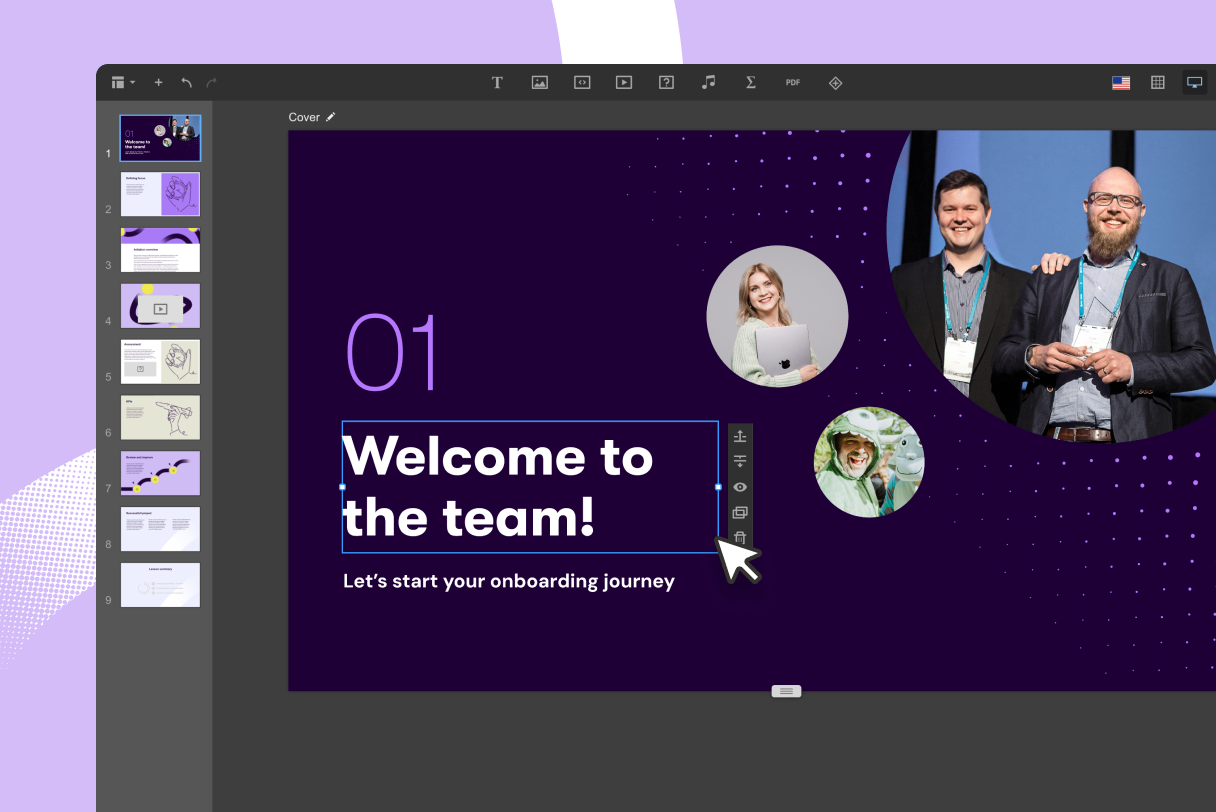
Example of Valamis Content Authoring capabilities
The kind of e-learning course that you create depends on these core content authoring features:
Images
- Add or import images
- Edit images
Audio
- Import and export audio files
- Edit audio files
- Record audio for narration
- Include audio files in on-screen interactions
Video
- Webcam recording
- Screen recording
- Import and export videos
- Insert videos to interactions
- Link to external video sources
- Edit videos
Animations
- Animate on-screen images or text
- Ability to import HTML5 animations
- Ability to insert text animations
Formatting
- Text & style editing
- Object alignment & editing
- Background themes
- Create master slides
- Navigation player skin options
- Page transitions
- Responsive design
- Importing a PowerPoint lesson
2. Interactivity
An e-learning that engages a learner by having them actively participate in the course involves a host of interactive features.
Interactivity can help increase learner engagement and retention by enabling the learner to take a more active role in acquiring information; this can be through the discovery of information, solving a problem, or working through scenarios.
Here are some major features that improve interactivity:
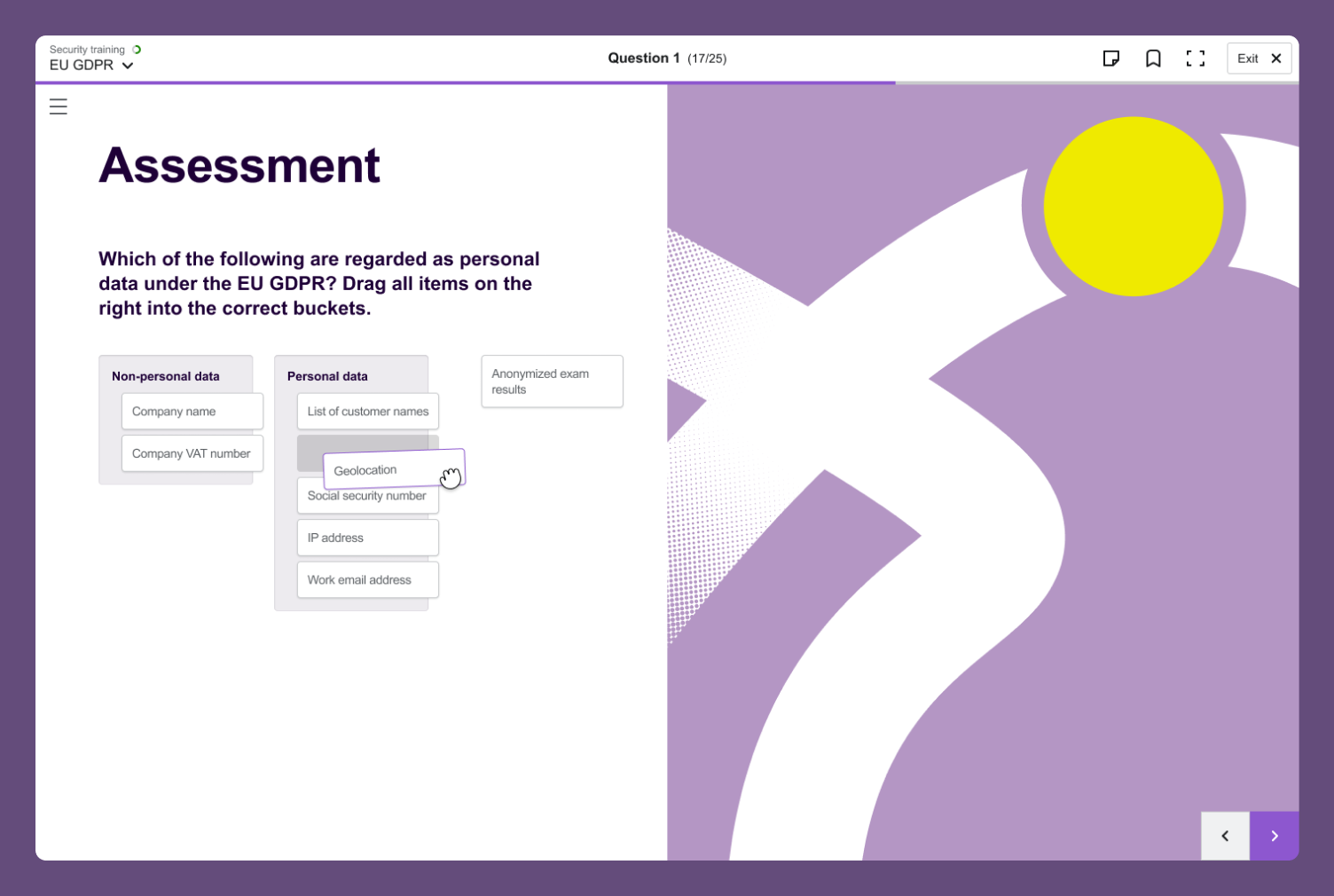
- Built-in activities: drag & drop, matching, hotspot reveal, sliders, or dials
- Create custom activities or games
- Create interactions or character scenarios with on-screen objects or images by:
- Slide layers
- States
- Triggers
- Pop-ups
- Variables
- Markers
- Buttons
- Scrolling panels
3. Templates and theme
Whether you have specific organizational branding or you just need to find a consistent look and feel, the theme capability of an authoring tool will help you establish the right design for your course.
A consistent theme and template is especially important if you are developing more than one course for the same audience.
Having a consistent look and feel means that your learner’s attention is on the content instead of being distracted by different designs.
Here are some template features to consider:
- Custom theme for entire course
- Background themes
- Built-in template shells
- Ability to create custom templates
- Navigation player skin options
- Ability to import external themes or templates
4. Content management
It is important to be able to organize your assets, media and other content.
You may want to use them again later, either for a new course or for updating a course in the future. It saves time on development and keeps the workflow organized.
Content management features also enable you to stay in control of all the tools and resources you need during the development of your e-learning.
Here are some core content management features to look for:
- Course and lessons libraries
- Quiz and question bank
- Template library
- Resource & Media library (video, audio, images, etc)
5. Collaboration
E-learning development involves many different people, which can make things challenging when you have to start sharing the course file with them.
With the collaboration options now available, keeping all stakeholders involved has never been easier.
Collaboration features enable you to quickly and easily share an e-learning with whoever else might need to see it or work on it.
Consider the following features for getting collaboration going on your own e-learning project.
- Review system with feedback
- Co-authoring
- Shared resources
- Share options (email, link, social media, upload)
- User roles
- Author control
- Versioning
6. Assessment
Assessment features help determine what your learner has retained in the course, enables a way to track learner achievement and progress, and also helps you to determine the effectiveness of the course.
The following features contribute to assessing the learner:
- Quizzes
- Form-based questions
- Open questions
- Multiple retry attempts
- Feedback
- Course assessments
- Question bank
- Random questions
- Shuffle
- Scoring
- Negative scoring
- Badges
- Analytics
- Tracking
- Reporting
7. Accessibility
Making sure that everyone can take your e-learning course is at the heart of accessibility.
In order to respect the different audio-visual sensory needs of individuals, accessibility features can change or add on-screen elements, interactions and formatting in order to suit different audience needs.
Here’s a list of features to look out for in an authoring tool in order to make your e-learning development more accessible:
- Compliance with Section 508 accessibility guidelines
- WCAG 2.0 Support
- Closed Captions (CC)
- Keyboard-accessible navigation
- Accessible font sizes
- Custom tab order
- Skip navigation
- Language ID for screen readers
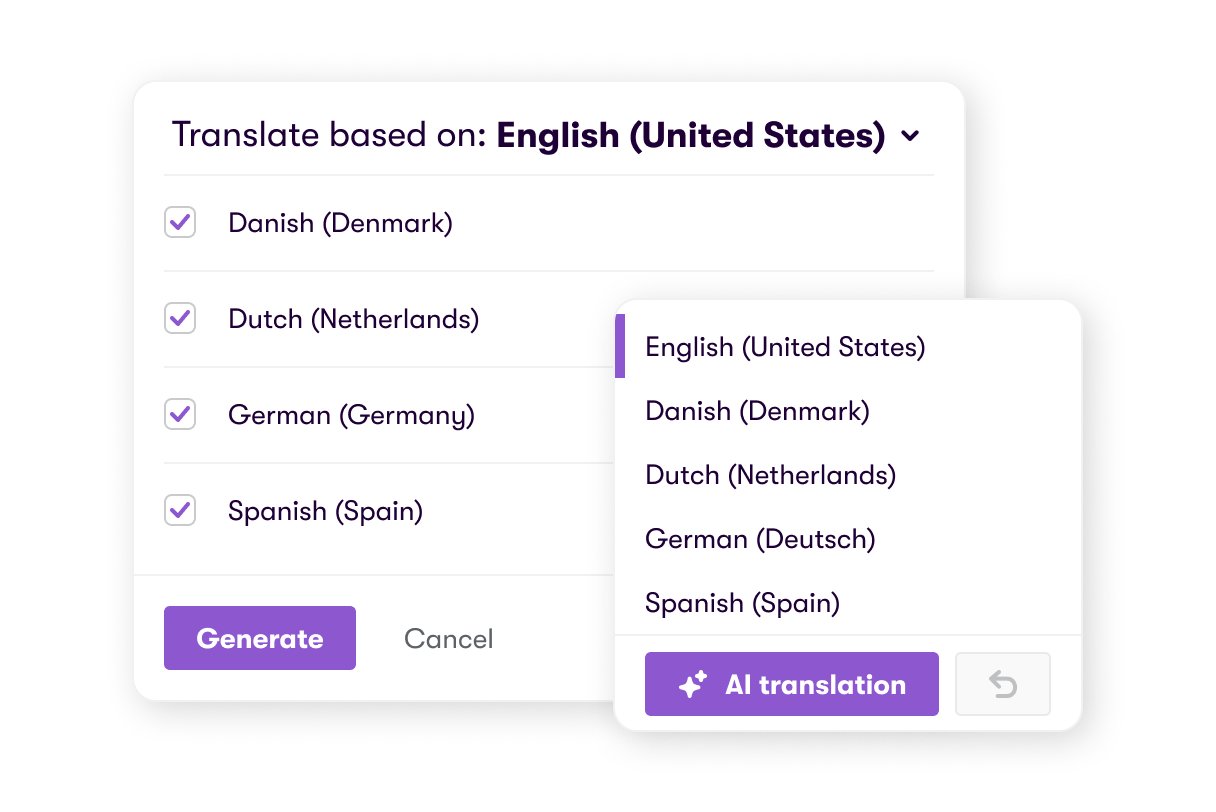
- Translation file export
8. Publishing
Every organization has its own specific publishing requirement in order for an e-learning to be uploaded and made accessible for learners.
It is important to check what your own requirements may be in order to choose an authoring tool that is compliant with your organization’s Learning Management System (LMS) or needs.
Here are the most current publishing formats available:
- HTML5
- xAPI
- iOS
- Android
- File
- Cloud-based
- Publish to Microsoft Word or PDF
- Compliance standards
- SCORM
- xAPI
- AICC
9. Administration
Having the flexibility to set-up preferences and organize the workflow enables everyone to work in their own style.
Administration features enable you to set-up the tool for the way you need to work.
They also help you to get more out of the features and functionality of the authoring tool.
Here’s a list of administration features that can come in handy:
- Language settings
- Flexible workspace setup (movable windows, tools, dockable panels)
- Preview and view preferences
- Autorecovery
- Roles and permissions
- Single sign-on (security)
10. Support & training
Both novice and experts benefit from help being available with any authoring tool. How much support and assistance you might want depends on your needs.
Some authoring tool brands offer help in the form of live chat support, training courses or guides on specific topics, and even dedicated community forums that enable developers to get troubleshooting help or ask questions.
Here are the types of support and training features often available:
- Online community forum
- Live chat support
- E-mail or phone support
- Tutorials and how-to guides
- Video guides
- Consultancy services
- Webinars
- Demos
- Updates & Upgrades
What does SCORM compliant authoring tool mean?
Most elearning authoring tools need to be compliant with content standards. This means that the course can be exported to a file type that will be compatible and supported by SCORM compliant LMS systems.
For end-users to access a published course, the course needs to be located somewhere accessible, such as the internet or an LMS. This is where content standards come in.
The most common standards are SCORM, AICC or xAPI.
When the elearning content is exported to one of these standards, it will be compatible with an LMS that supports the same standard.
Because there are so many types of authoring tools and LMS platforms, the absence of a standard would mean that authoring tools and platforms would not be able to speak to each other. Content standards, like SCORM and xAPI, ensure smooth integration.
But don’t worry, when you choose the right vendor they will assist you in either implementing your existing content or developing new material, much like Valamis does. Request a call to get the advice from our experts.
How to choose an authoring tool?
How do you choose an authoring tool for your own training or organizational needs?
In order to make the right decision, it is important to understand the needs and requirements of your specific training project.
Most authoring tools have their own unique combination of features and capabilities catering to different training needs.
Ask questions about your project in order to understand what features and capabilities you may need, such as:
What expertise level will be working with the software?
- Novice level with no programming experience
- Expert level with programming experience
What kind of e-learning course do you want to create?
- Quick, template-based course with text and images
- Video-based e-learning
- Animation-based e-learning
- Custom scenario-based e-learning
- Custom e-learning with complex interactions and graphic design
With a clearer picture of the intended e-learning project, the features and capabilities of software can be checked to ensure that the right tool is chosen.
What types of authoring tools are available?
Technology changes quickly over time, and content authoring tools are no exception.
In a bid to keep up with new modes of learning, like mobile or app-based learning, new and revised authoring tools are coming to the market with a variety of features and functionality for every need.
At a high-level, elearning authoring tools can be both cloud-based and desktop-based, with cloud-based gaining in popularity.
While offering the same core features and functionality as the desktop version, cloud-based authoring tools allow several people to work on the same course at once with other developers or stakeholders.
No large software install is required, nor the need to check for updates.
How is AI changing authoring tools?
AI has moved quickly from a feature in authoring tools to the reason some of them exist. A new category of AI-first tools has appeared alongside the established names, and almost every existing tool has added AI of some kind.
Three capabilities are worth separating, because vendors tend to describe all of them as simply AI.
Drafting
Generating a first draft of a lesson, learning objectives, a summary or an outline, either from a blank page or from a document you already have. This is the most common capability and the easiest to evaluate: ask to see it run on one of your own documents rather than a demo file.
Assessment generation
Turning a lesson, policy, procedure or video transcript into questions, with suggested answers and difficulty levels. Writing assessments is usually the slowest part of building a course, so this is where the time saving tends to be largest.
Translation
Producing a course in other languages without rebuilding it. The questions that matter here are whether a human can review and edit before publishing, and whether you can hold terminology steady with a glossary. Automatic translation without either of those is a compliance risk rather than a time saver.
In every case, ask what happens to the output. AI that produces a draft you then have to rebuild elsewhere has moved the work rather than removed it.
Where this sits in Valamis
Most organizations end up with authoring in one system and delivery in another. You build a course in a standalone tool, export a package, upload it to the LMS, and repeat all of that every time someone spots a typo.
Valamis Studio is the authoring tool built into the platform, so there is no separate licence, no export and no upload step. Content is created where it is delivered, and an edit goes live without republishing anything.
What that changes in practice
- Subject experts can build content safely. L&D sets the frame with templates, theme controls and permissions, so the people who hold the knowledge can write without anyone going off brand.
- Everything is xAPI-native. Content built in Studio writes straight into the same learning record as everything else, so you can see how a lesson actually performed rather than only who finished it.
- AI assistance is in the tool, not bolted on. Drafting, question generation and translation with glossary control and human review before publishing.
- Authors can see what worked. Preview as a learner or as a specific audience before publishing, then track engagement, completions and time on task afterwards.
- No coding, and no rebuild for devices. Drag and drop building with slides, audio, video, quizzes and interactive activities, responsive by default with per-device previews.
Standalone tools like Storyline and Captivate are powerful, and for teams with dedicated instructional designers building complex simulations they remain the right answer. For everyone else, the question is whether the capability justifies a second licence, a second tool to learn and an upload step on every change.
Frequently asked questions about authoring tools
What is an eLearning authoring tool?
An eLearning authoring tool is software for creating digital learning content. It lets you build lessons from slides, text, images, video, audio and interactive elements, then publish them in a format your LMS can host and track.
What is the difference between an authoring tool and an LMS?
An authoring tool creates the content. An LMS delivers it, assigns it to people and records what they completed. Some platforms include authoring, which removes the step of building in one system and importing into another.
What does SCORM compliant mean?
A SCORM compliant authoring tool exports courses in a package any SCORM compliant LMS can import and track. It is the long-standing standard for interoperability, though xAPI now covers learning that happens outside a course as well.
Do you need a separate authoring tool if your LMS has one built in?
Often not. A built-in authoring tool removes the export and import step, keeps content and delivery in one place, and means updates go live without republishing a package. A separate specialist tool may still be worth it for highly complex simulations.
What should you look for when choosing an authoring tool?
Start with what your team can realistically use. Then check publishing formats against what your LMS accepts, whether several people can work on a course at once, whether it meets your accessibility obligations, and what support comes with it.